
Alerts overview
Making an ingredient Franchisor-exclusive says a store must buy it from you. The rule is only worth as much as your ability to check it.
A store that buys its beans from the market down the road keeps selling your menu, keeps taking normal sales, and simply orders less from you. Nothing in a sales report says so — its revenue may even be excellent. This is off-book sourcing: the store stays open, your margin quietly disappears, and the product your brand is judged on stops being the product you supplied.
The Alerts screen is where that becomes visible. It watches every Franchisor-exclusive item across every connected store and every authorized partner-supplier, and turns the two traces off-book sourcing leaves behind into two tabs you can act on.
The two traces, and the tab that finds each
Ingredients bought outside your channels have to show up somewhere. They show up in exactly two places, and each tab is built for one of them.
Trace 1 — the stock stops adding up
For a Franchisor-exclusive item there is exactly one way stock can go up in the app: receiving an order from you. The same item cannot be ordered from another supplier, and it cannot be booked in as an expense — both are refused. On the other side, every sale takes stock out, as much as that drink's recipe says it uses.
So picture a store that buys the item somewhere else. The shelf fills up, but nothing about that purchase can reach the app — while the sales it supplies are rung up as usual. The recorded level keeps falling, and eventually crosses zero: the store has sold more than it ever received. That crossing is the first alert, and it is arithmetic rather than suspicion.
Which leaves exactly two ways to keep the recorded level above zero: correct the count upward at a stocktake, or trim the recipe so each sale deducts less than the drink really uses. There is no third lever — so both are watched for excess.
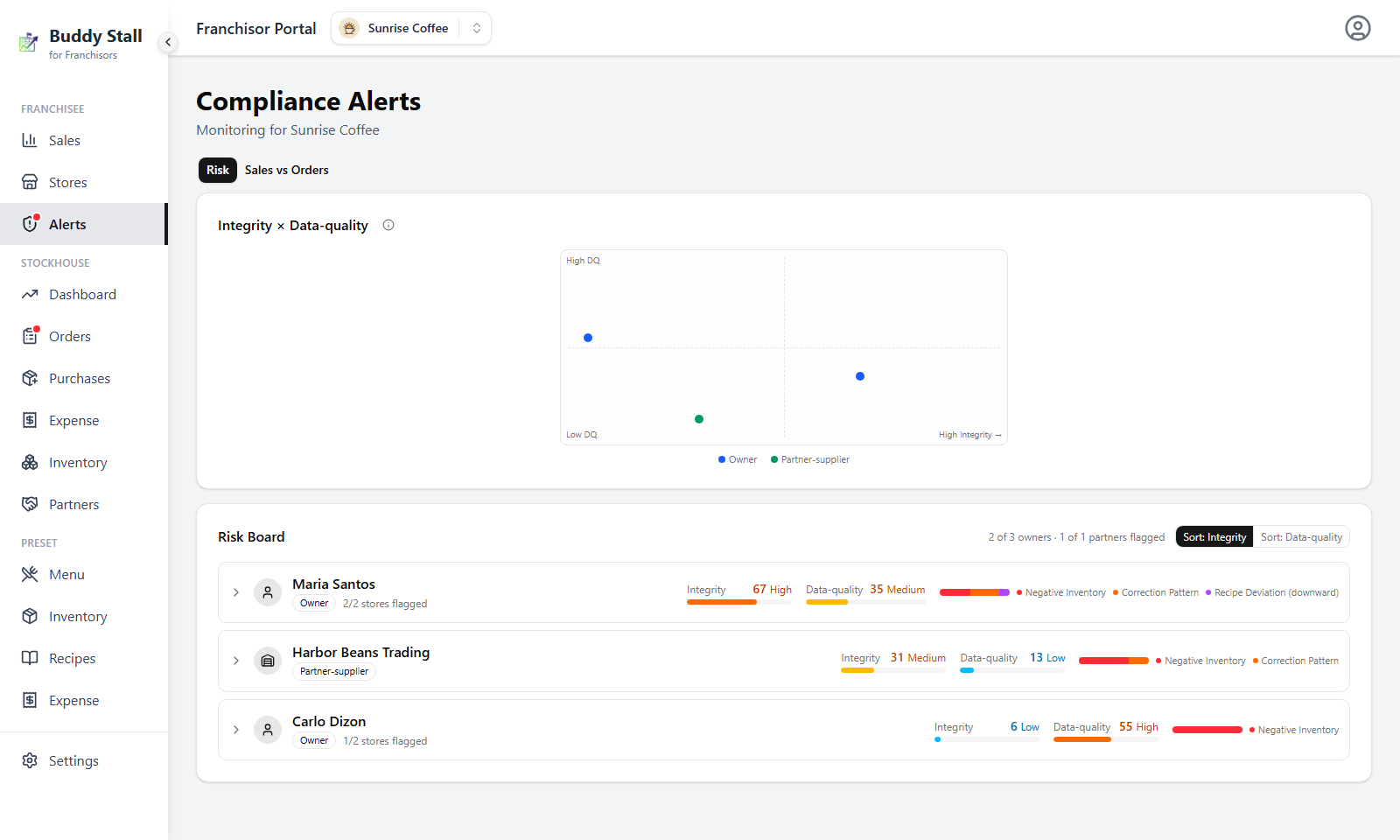
Negative stock, corrections that keep reappearing, and recipes set below their preset — those three are exactly what the Risk board reads. It scores every owner and partner-supplier on how much of that evidence they carry, and ranks them so the worst sits at the top.
Trace 2 — the ordering stops matching the selling
The second tab leaves the stock records alone and compares two figures no bookkeeping moves: what a store sold, against what it ordered through approved channels — your StockHouse and your authorized partner-suppliers. A correction does not create an order, and a trimmed recipe does not reduce sales.
It has to work that way, because both levers above only change what the app says is on the shelf. A store that works them carefully keeps its line above zero and never reaches the Risk board; a store that is simply bad with the app reaches it while sourcing everything from you — a delivery entered a week late, a stocktake keyed in wrong, a portion typed with an extra zero. A case missed in one direction, a false alarm in the other.
That comparison is Sales vs Orders: one percentage per store, on the same footing across the whole network. It catches the store that covered its tracks well enough to stay off the Risk board, and clears the one whose alerts were only clumsy record-keeping.
Which alerts are real
An alert can mean concealment or it can mean clumsiness, so the Risk board is built to tell the two apart before you pick up the phone. Everything it finds is scored in two independent lanes, never added together:
- Integrity — should I investigate? Stock that went missing, corrections that keep reappearing, portions quietly trimmed.
- Data-quality — should someone fix the records? Deliveries entered days after they arrived, recipes with an impossible portion typed into them.
Merged into one number, the careless store and the dishonest one would look identical — and the careless ones are far more common. Kept apart, a store that records everything late but sells honestly scores high on Data-quality and low on Integrity: a training problem, not an investigation.
The lanes narrow it; Sales vs Orders settles it. High Data-quality beside a healthy sourcing ratio is a store that needs help using the app. High Integrity beside a ratio far below the network is the case worth opening.
Working the screen
The dot beside a franchise's Alerts entry is the Risk board's Integrity band, so the everyday flow starts on that tab and ends with a decision about one owner:
Follow the dot to the Risk board
Amber or red means someone has reached Medium or above on Integrity. The board is already ranked worst first, so the rows worth reading are the top ones.
Open the evidence, and note the lane
Every score expands into the alerts behind it — which item, how deep, which rule fired, when. A row carrying only Data-quality is a record-keeping conversation, not a case.
Cross-check in Sales vs Orders
Everything the board found came out of records the store keeps itself; this tab did not. A store that also orders far less than its sales imply is the one to take seriously — that is the objective ground. A healthy ratio beside the same alerts points the other way: records mishandled, product accounted for.
Then decide whether to call
Bring the evidence, never the score. Most cases end in the call: a delivery nobody entered, a stocktake done badly, a recipe typed wrong. The ones that do not are what this screen exists to surface.
The Risk board reacts; Sales vs Orders does not. The store that keeps its records tidy never lights the dot, so nothing will ever prompt you to check it. Make a pass over the ratios every month or so, and note anyone sitting far below the rest of the network or in No Orders — that pass is the only routine that finds this case.